


Call Control. Call Blocker
3.935.93K Reviews
App Specs
- Version
- 2.15.15
- Updated On
- License
- Free
- Downloads
- 5,000,000+
- Developer
- Call Control LLC
- Categories
- Communication
- Platform
- Android
Screenshots

 Analysis by AppCompare
When unwanted calls interrupt a workday or family time, the choice is not simply whether to block them; it is how much control you want over what gets through. I see Call Control: Call Blocker as a practical option for people who want a dedicated tool for screening calls and texts, rather than relying only on the basic controls already built into a phone. Its community reporting and personal blocklist give it a useful mix of shared filtering and individual control, though any call blocker needs sensible settings so a legitimate caller is not caught by mistake.
What to consider before installing
I would start by asking what is causing the most trouble: repeated calls from a few numbers, a broader stream of suspected spam, or unwanted messages as well as calls. That distinction matters. A built-in phone setting can be enough if you only need to silence unknown callers or block one contact. A specialist app makes more sense when you want a separate place to manage blocking and benefit from reports made by other users.
Call Control is a free communication app from Call Control LLC, with optional in-app purchases listed from $2.99 to $29.99 per item. It is rated for Everyone and has an average rating of 4.0 from around 112,000 ratings, with more than 5 million installs. Those figures suggest a well-established audience, but they do not guarantee that every caller you want to stop will be identified—or that every number flagged as unwanted is irrelevant to you. I treat community filtering as a helpful signal, not an infallible verdict.
The app’s version is 2.15.14, and it requires Android 8.0 or later. If you are choosing it for an older device, check that requirement before planning a switch. The age rating makes it broadly suitable for general audiences, while the free starting price lets you try the basic experience before deciding whether any paid option is worthwhile. I would review any purchase details in the app and decide based on the features you actually use, rather than assuming an upgrade is necessary.
Getting Started with Call Control
First things first, getting Call Control: Call Blocker up and running is a breeze. The app is available for both Android and iOS, so you’re covered no matter what device you’re using. Once you download it, the setup process is pretty straightforward. You’ll be prompted to grant the necessary permissions, which is essential for the app to function effectively.
A User-Friendly Interface
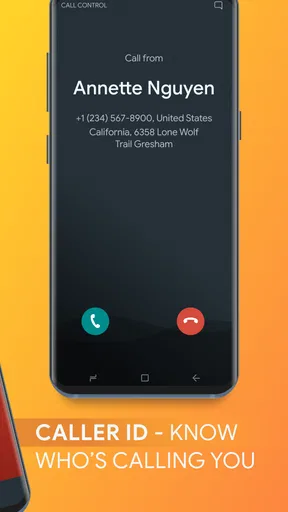
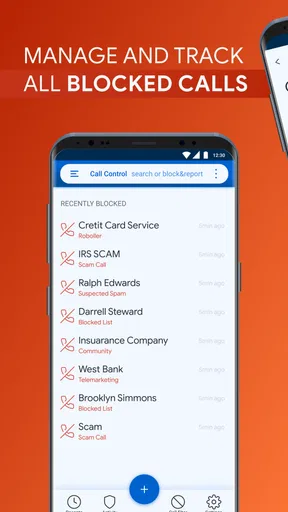
The first thing I noticed was how clean and intuitive the interface is. The developers clearly put a lot of thought into making navigation as simple as possible. You don’t need to be a tech wizard to figure this one out. Everything you need is right there on the main screen, allowing you to block calls with just a few taps.
Features That Stand Out
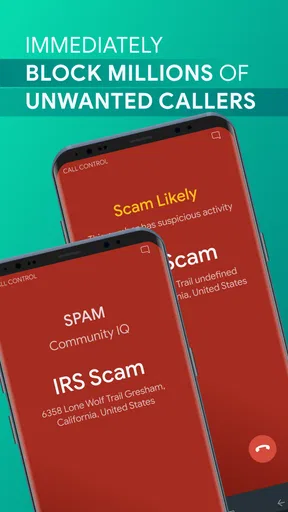
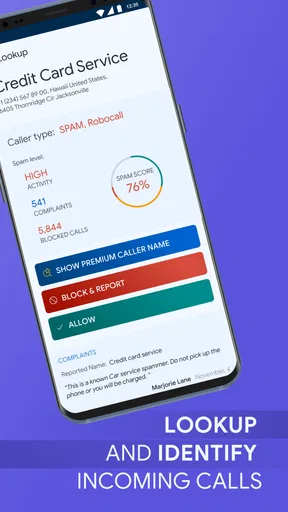
Now, let’s dive into the meat of what Call Control offers. One of the standout features is the community-based call blocking. It’s like a collective effort to weed out those annoying calls. Users can report spam numbers, and the app updates its database based on these reports. So, you're not just relying on your own experiences but benefiting from a whole community of users.
Worth Reading Before You Choose

EA SPORTS FC Mobile 26 Is a Bigger Football Game, but It Takes Time

Flipboard Shows What News Apps Must Do Beyond the Feed

Switching to Android Auto Means Rethinking Your Driving Routine

Google Calendar Makes a Crowded Week Easier to Manage

Ludo King Makes the Most of the Minutes Between Plans

Baby Panda World Brings Quick Play to Modern Phones, but Its Game Library Feels Busy
Another feature I love is the personal blocklist. You can add numbers you want to block manually, which is super handy if you have a persistent caller who just won’t take a hint. Plus, the app provides blocking for both calls and text messages, so you’re covered on all fronts.
Putting shared and personal blocking to work
The community list and your own blocklist solve different problems, and I would use them that way. Shared reports are useful when an unfamiliar number appears to be part of a wider nuisance pattern. A personal entry is better for a number you recognize and want to stop regardless of whether other users have reported it. Keeping that distinction in mind makes it easier to understand why one unwanted call may be blocked while another still gets through.
There is also a trade-off in community-based filtering: a number that is suspicious to many people may still be important to you. For example, a service provider, delivery contact, or local business might call from a number you do not have saved. If you are expecting a call from someone new, I would avoid treating every unknown number as automatically disposable. Check the call history and your block settings before assuming a missed contact was spam.
A useful habit is to add a number to your personal list only after you have a clear reason to block it. That keeps the list intentional and makes it easier to review later if circumstances change. It is especially helpful when a number belongs to a person or organization you once needed to hear from but no longer do. A blocklist works best as a maintained set of decisions, not a place to send every caller you do not immediately recognize.
Performance and Reliability
In terms of performance, Call Control is top-notch. It’s been running smoothly on my phone without any noticeable impact on battery life, which is a huge plus. The app works silently in the background, so you’re not constantly reminded of its presence, yet it’s always ready to spring into action when an unwanted call comes through.
I've also noticed a significant reduction in spam calls since I started using it. It's like a breath of fresh air not having to deal with interruptions from unknown numbers during important meetings or while I’m just chilling at home.
A realistic day-to-day use
Imagine you are waiting for a call about an appointment while several nuisance calls have been interrupting your afternoon. This is where I would use the app deliberately: let the shared reports help with numbers that appear to be widely unwanted, and use the personal blocklist for a repeat caller I have identified myself. I would keep an eye on missed calls until I knew the setup was behaving as expected. That small check is worthwhile when you are expecting a call from a clinic, a school, a new client, or another number that is not saved in your contacts.
For someone who spends much of the day on calls, the benefit is not only fewer interruptions. It is also having a clearer routine: review an unfamiliar call when convenient, decide whether it is worth blocking, and avoid reacting to every ring in the moment. On the other hand, if you are waiting for calls from many new people, aggressive blocking may be the wrong approach. In that situation, I would favor a lighter filter and check missed calls regularly rather than trying to make the phone completely quiet.
Customization Options
I'm big on personalization, and Call Control doesn’t disappoint in this department. You can tailor the settings to suit your preferences, whether you want to block specific area codes or even entire countries. It also allows you to set up a "Do Not Disturb" mode, which is perfect for when you need some peace and quiet.
Choosing settings without overblocking
Area-code and country-level rules can be convenient when unwanted calls follow a recognizable pattern, but they are broad tools. I would use them only if I rarely need legitimate calls from those regions. If you travel, work with people in different places, or expect calls from organizations that use unfamiliar numbers, a broad rule can create avoidable friction. Start with the narrowest setting that solves the problem, then widen it only if the interruptions continue.
Do Not Disturb is useful for quiet periods, but it is not the same decision as blocking a number permanently. I would use a temporary quiet mode when I need uninterrupted focus, and reserve the personal blocklist for callers I do not want reaching me at all. Separating those jobs makes it easier to avoid turning a short break from interruptions into a longer-term missed-call problem.
How it compares with other ways to screen calls
The usual alternative is the phone’s built-in call controls. They can be a better fit if your needs are simple, you prefer to keep everything within the standard dialer, or you do not want another app to configure. Call Control’s stronger case is the combination described here: shared reporting, a manually managed blocklist, and controls that cover texts as well as calls. That makes it more appealing when unwanted contact is recurring rather than occasional.
Another approach is to use a carrier’s call-screening tools, where available. Those may suit people who want filtering handled as part of their phone service, but the exact options depend on the carrier. I would compare the controls you already have before installing anything: if they reliably handle the problem, an extra app may add unnecessary setup. If you want user-reported number blocking and a personal list in one place, Call Control is the more focused choice.
It is also not the right answer for every kind of unwanted contact. If the main issue is a person who keeps reaching you through new numbers or through several channels, blocking individual callers may not resolve the wider situation. For a few persistent numbers, the app’s manual list is straightforward; for a more complicated pattern, consider the phone’s broader privacy and safety settings too. I would not expect a call blocker by itself to replace careful handling of unknown messages or calls.
What switching involves
Moving to a dedicated blocker is a small change, but it does mean deciding how much access and control you are comfortable giving an app. Read the permission prompts rather than tapping through automatically, and grant what is needed for the functions you plan to use. If you later decide it is not for you, check the app and phone settings so you understand which blocking rules remain active and which are managed by the system.
I would also avoid enabling every available rule on day one. Begin with a short personal blocklist and a conservative approach to unfamiliar numbers; then adjust after seeing how it handles your normal calls and messages. This makes it easier to notice whether a missed call was caused by a setting, and it reduces the chance of having to troubleshoot several changes at once. The best filter is not necessarily the strictest one—it is the one that quiets genuine nuisance calls without disrupting the contacts you rely on.
Who will get the most from it
I would recommend trying Call Control if spam calls and unwanted texts are a recurring annoyance, you are comfortable managing a blocklist, and you want community reports to supplement your own choices. It may be especially useful if you have already identified repeat callers but still receive unfamiliar numbers that deserve a closer look. Its free entry point makes it reasonable to test, while optional purchases are a reason to check the available terms before spending.
I would skip it if your phone’s built-in controls already handle occasional nuisance calls, if you need to accept calls from many unknown numbers, or if you would rather not configure a separate blocking app. It is also a poor fit if you expect any filter to identify every unwanted caller perfectly. Call blocking is a judgment aid, not a guarantee that the phone will never ring at the wrong moment.
Final Thoughts
All in all, Call Control: Call Blocker is a solid choice if you're tired of unwanted calls and texts. Its ease of use, combined with powerful features, makes it a must-have app for anyone looking to regain control over their phone. Whether you’re a tech-savvy user or a newbie, this app caters to all, providing a seamless and effective way to block those intrusive calls.
So, if you’re ready to enjoy a spam-free phone experience, I’d definitely recommend giving Call Control a shot. It’s made a huge difference for me, and I’m sure it’ll do the same for you!
Pros
- Effective spam call blocking feature.
- User-friendly interface for easy navigation.
- Customizable block list options.
- Automatic updates to block lists.
- Minimal impact on battery life.
Cons
- May block wanted calls accidentally.
- Subscription required for premium features.
- Occasional false positives in blocking.
- Limited features in the free version.
- Does not block SMS messages.
FAQs for Call Control. Call Blocker
What features does Call Control. Call Blocker offer to manage unwanted calls?
Call Control. Call Blocker provides a comprehensive suite of features to manage unwanted calls, including blocking spam calls, allowing only contacts to reach you, and a community blacklist that updates automatically. The app also offers personalized blocking options, ensuring that users have full control over who can contact them.
Is Call Control. Call Blocker easy to set up and use?
Yes, Call Control. Call Blocker is designed with user-friendliness in mind. The setup process is straightforward, guiding users through permissions and preferences. The interface is intuitive, allowing users to easily access features such as the call log and settings to customize their blocking preferences.
Does Call Control. Call Blocker require an internet connection to function?
While Call Control. Call Blocker can function offline using local lists and settings, it benefits from an internet connection to access real-time updates from the community blacklist. This ensures users are protected against the latest spam numbers and can report new ones effectively.
How does the community blacklist feature work in Call Control. Call Blocker?
The community blacklist in Call Control. Call Blocker is a dynamic feature where users can report spam numbers. These reports are aggregated to create a comprehensive list of unwanted callers. The app updates this list regularly, enhancing its effectiveness in blocking spam calls for all users.
What privacy measures does Call Control. Call Blocker implement to protect user data?
Call Control. Call Blocker prioritizes user privacy by implementing strict data protection measures. The app does not share personal information without consent and uses encryption to safeguard data. Users can adjust privacy settings to control what information is shared with the community feature.


